
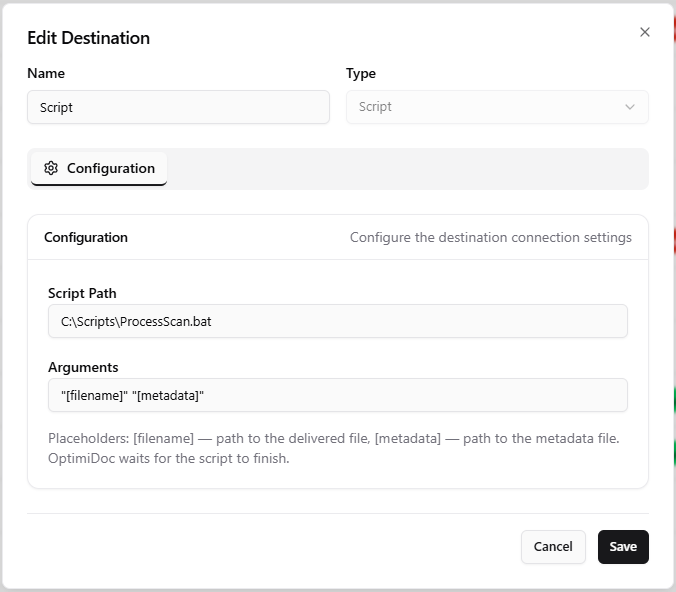
The Script destination hands each scanned document to a custom script or executable on the OptimiDoc server, passing the file path (and any metadata file) as command-line arguments. It is the most flexible delivery option -- use it to push scans into any system that can be driven from the command line when no built-in destination fits.
How It Works
The Script destination is a delivery-only destination in OptimiDoc's unified destination model -- it cannot be browsed from the device panel and is not used for pull print. When a scan template delivers to a Script destination, OptimiDoc processes the finished output like this:
-
Each output document is written to a working file named after the template's output filename pattern.
-
OptimiDoc builds the argument string from the Arguments field, substituting the placeholder tokens (see below) with the document's path.
-
If the document has an associated metadata file (produced when metadata output is enabled in the template), it is written alongside the document and its path is substituted for
[metadata]. -
OptimiDoc starts the configured script and waits for it to exit before moving on to the next document.
Because the script is executed once per output document and OptimiDoc waits for each invocation to finish, a scan that produces several files -- for example when barcode or blank-page separation splits a job -- runs the script several times, once per resulting document.
Configuration
|
Setting |
Description |
|---|---|
|
Script Path |
Full path to the script or executable to run (e.g. |
|
Arguments |
Command-line arguments passed to the script. Use the placeholder tokens below to inject the scanned file and metadata paths. |
From the release following 26.07 the form shows only Script Path and Arguments: the script always runs once per delivered document and OptimiDoc always waits for each invocation to finish, so there is nothing else to configure. In 26.07 and earlier the form also showed Working Directory and Wait for script to complete fields, but they had no effect on delivery and have been removed.
Argument Placeholders
The Arguments field shows a hint listing the supported tokens below, which the delivery engine replaces at scan time:
|
Token |
Replaced with |
|---|---|
|
|
Full path to the scanned output document |
|
|
Alias of |
|
|
Full path to the document's metadata file (only when metadata output is enabled) |
For example, "[filename]" "[metadata]" passes the document path and its metadata file to the script as two quoted arguments.
Note: use the bracketed tokens above. Values such as
{file}or{user}are not substituted by the Script destination and would be passed to the script literally.
Security
-
The script runs under the security context of the OptimiDoc service account. Grant that account only the permissions the script actually needs.
-
Treat file names and any parameter-derived values as untrusted input -- validate and quote arguments inside your script.
-
Prefer a wrapper batch or PowerShell script that writes its own log, so failures are diagnosable after the fact.
-
Use an absolute path for the script to avoid path-resolution surprises when the service runs it.
When to Use
Choose the Script destination to integrate scans with a line-of-business system that has no native connector -- for example importing into an ERP or DMS through its command-line client, triggering an indexing job, or moving files with custom naming logic. For straightforward file, FTP, cloud, or e-mail delivery, use the dedicated destination types instead.
Related Articles
-
Output Options -- Output filename patterns and metadata file settings
-
Scan Destinations Overview -- All available destination types
-
Folder Destination -- Save output to a local or network folder