
The Dropbox destination uploads scanned documents to a folder in a Dropbox account using OAuth 2.0. Authorise OptimiDoc once and scans are delivered automatically -- refresh tokens keep the connection alive without periodic re-authorisation.
How It Works
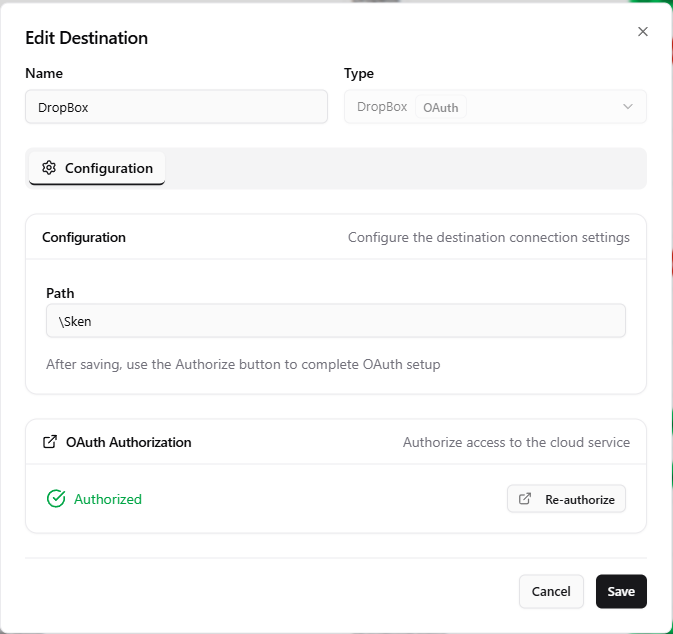
Dropbox is a delivery-only destination. OptimiDoc uploads each output document to the folder given in Path. Authentication uses OAuth 2.0 through OptimiDoc's built-in Dropbox application, so you do not register your own app or enter client keys -- you only authorise access.
Since release 26.07, OptimiDoc requests and stores a refresh token, so the connection survives access-token expiry and keeps delivering without manual re-authorisation. The folder path is normalised automatically to the form the Dropbox API expects.
Configuration
|
Setting |
Description |
|---|---|
|
Path |
Target folder in Dropbox (e.g. |
Filename placeholders can be used in the path to organise uploads (e.g. /Scans/{user}/{date}). See Output Options.
Authorising the Connection
-
Enter the Path and Save the destination.
-
Re-open the destination. An OAuth Authorization card shows the current status (Not authorized or Authorized).
-
Click Authorize. OptimiDoc redirects your browser to Dropbox's consent page; after you grant access you are returned to OptimiDoc and the tokens are stored with the destination.
-
Once authorised, use Test Connection to confirm access. Test Connection is hidden until the destination is authorised.
Use Re-authorize to refresh access, or Revoke authorization to clear the stored tokens. Revoking removes only OptimiDoc's local copy of the tokens -- the remote provider is not contacted -- and leaves the Path intact, so the destination simply returns to the Not authorized state until you authorise it again.
Best Practices
-
Use a shared Dropbox folder if several team members need access to the scanned documents.
-
Include
{user}or{date}in the path to keep uploads organised. -
Monitor the account's storage quota so uploads are not rejected.
Related Articles
-
Google Drive Destination -- Alternative cloud storage destination
-
Box Destination -- Alternative cloud storage destination
-
Output Options -- Filename patterns resolved at scan time
-
Scan Destinations Overview -- All available destination types